

Models group in Settings has two tabs: Models connects providers, and Default Models assigns models per scenario.
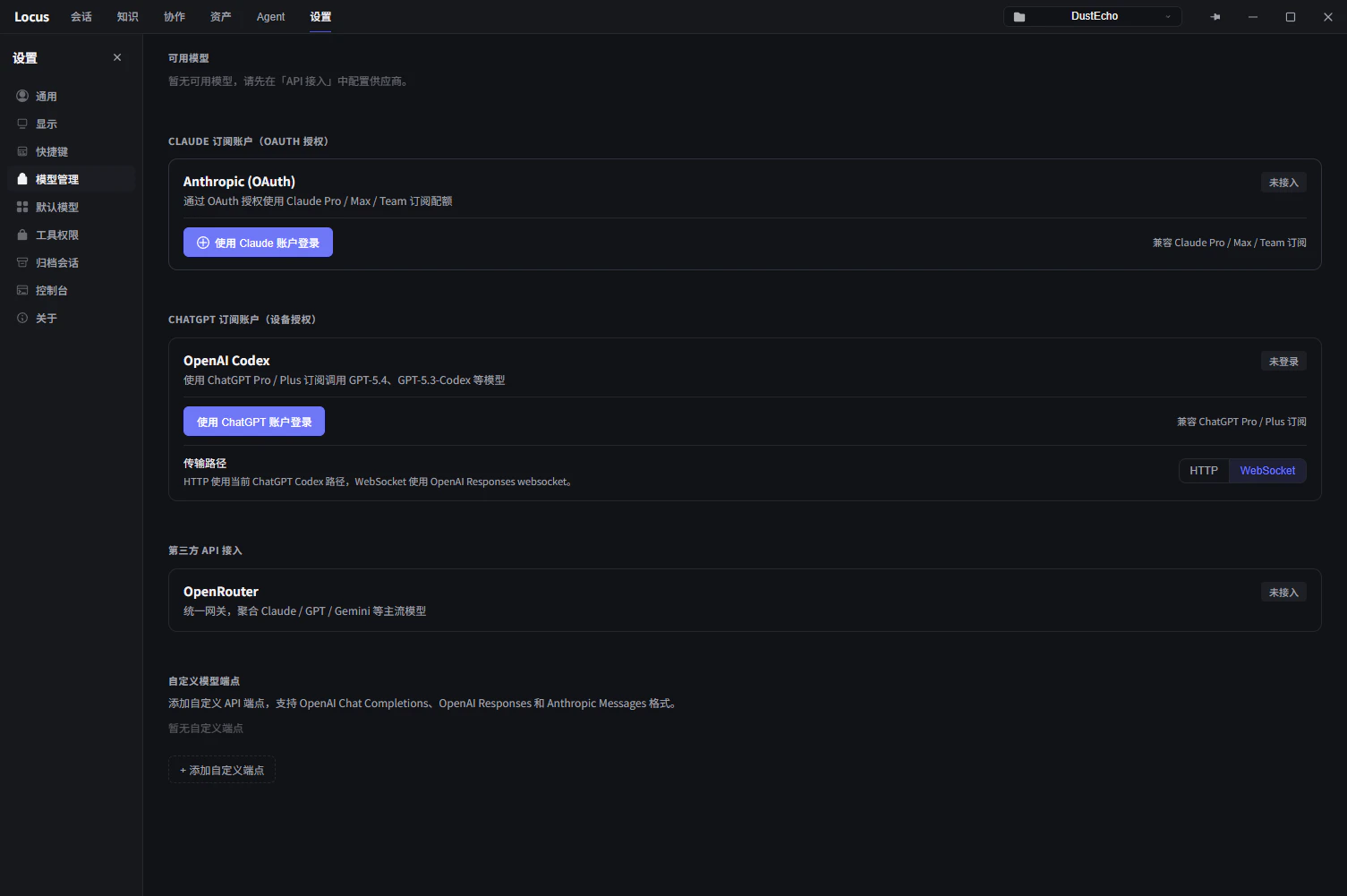
Subscription accounts
Claude Subscription: clickSign In, log in to your Claude account in the browser, then copy the authorization code shown after approval and paste it back into Locus. If Claude Code is installed,Import from Claude Codereuses its login. Once signed in,Remaining quotashows the5-hour limitand weekly windows.ChatGPT Subscription (Device Auth): clickSign in with ChatGPT, visit the link in your browser, and enter the code to authorize. Compatible with ChatGPT Pro / Plus plans.Import from Codex CLIis also available. After sign-in, quota shows theShort windowandLong windowremaining.Context windowdefaults to 272K and accepts values from 16K to 1M; the automatic compaction threshold scales with it.Claude Code CLI: Locus only calls the systemclaudecommand; Claude Code manages its own login state. If the CLI is detected but not logged in, runclaudein a terminal and complete/login.Test connectionsends a one-word probe through the CLI to verify the endpoint, credentials, and proxy a real run would use. Models from this source stay out of the model list until you turn onEnable Claude Code CLI models(experimental) in theDefault Modelstab.OpenRouter: paste an API key. A unified gateway for Claude, GPT, Gemini, and more.
Custom model endpoints
Custom Model Endpoints connects any compatible API service, including locally hosted models. Three message formats are supported:
Anthropic Messages: Claude-family APIs and compatible services.OpenAI Chat Completions: the most widely compatible format; most third-party and local inference services speak it.OpenAI Responses: OpenAI’s newer interface format.
Add Custom Endpoint and fill in:
Display Name: the name shown in the model list.API Model ID: the model field value sent to the API, such asgpt-4o.Endpoint URL: the base URL including/v1; paths like/chat/completionsare appended automatically.API FormatandAPI Key(optional; some local models require none).
Context Window (compaction triggers past this token count), Reasoning Effort (adds effort levels to the model selector), and Image understanding (enable when the endpoint accepts screenshots and image attachments). After saving, Test verifies connectivity. Multiple endpoints can coexist; Edit or Delete them at any time.
Default models
TheDefault Models tab assigns models per scenario; unset slots follow your current manual selection:
Main Chat Model: the default for the main chat session.Plan Mode Model: applied automatically when switching to plan mode, so plan design can use a stronger reasoning model. See Plan mode.Sub-agent Models: per-subagent model, reasoning-effort, and response-speed overrides used when the Agent dispatches sub-tasks. Unset options inherit the current session; speed can explicitly use Standard or Fast.
Privacy boundary
Apart from calls to the model services you configure, Locus is a pure client application and uploads nothing else to the internet. Sessions, knowledge, and configuration all stay on your machine; the storage location is described underLocal Data Storage in General settings.