

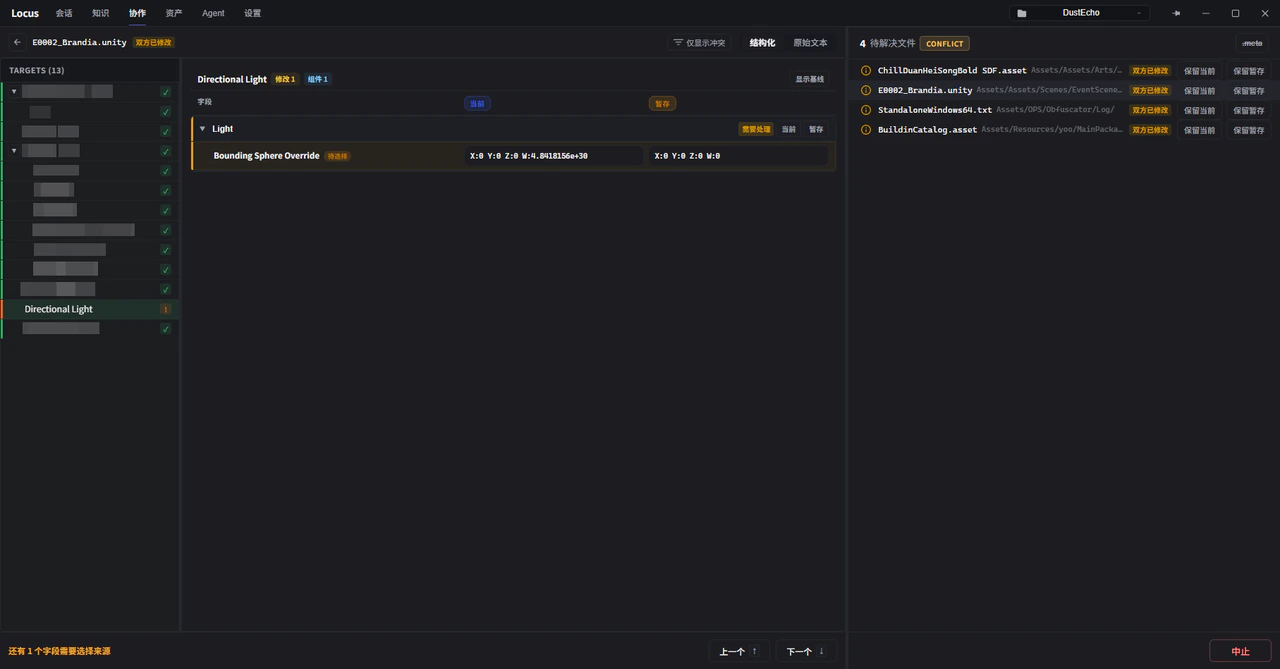
Limits during a conflict
While unresolved conflicts exist, other Git operations in the context menus (branches, commits, stashes, and so on) are disabled with the noticeUnresolved conflicts exist, actions are disabled. The right panel switches to the list of files to resolve: .meta conflicts are hidden by default (they can be expanded), and the bottom offers Continue / Skip / Abort. Abort drops the conflict-handling progress made so far and restores the workspace to the state before the operation started.
Field-level three-way merge
Click a conflicted file to open the resolution view. Unity YAML assets get aStructured view:
- A three-way comparison:
Current changes(your branch’s edits),Incoming changes(the other side’s edits), andShared base(the common starting point of both sides, toggled withShow shared base). In conflicts from applying a stash, the other column isStashed changes. - Click a field’s value in a source column and that side is chosen for the field;
Use X for this object,Use X for this section, andUse X for all fieldspick sides in bulk. - A choice is only needed where both sides changed the same field; fields changed on one side only resolve automatically.
Conflicts Onlyfilters out everything unrelated. - The bottom shows a live count of fields still needing a choice. Choices are only staged before write-back:
Apply structured resultperforms the actual write to the file, and leaving without applying discards the staged choices.
Raw Text tab keeps the traditional block-by-block picking, for unstructured files or cases that need manual rewriting. If the file is modified outside Locus, block picking is disabled and you edit the result directly below.
Compared with editing conflict markers by hand
Resolving Unity YAML conflicts in a text editor means comparing large runs of serialized data between<<<<<<< markers: a single field’s choice sits inside dozens of lines of context, and one wrongly deleted line can corrupt the file structure. Field-level merging changes the granularity from “whose lines” to “whose value for this field”, and Locus performs the write-back, removing the manual risks of cutting across field boundaries or leaving conflict markers behind. Object hierarchy and component ownership stay visible in the view, which also gives the judgment of whose change to take more to stand on.
For complex conflicts that need the full code context (a C# file where both sides refactored the same logic, say), you can still bring the AI into the analysis from the command line at the bottom, or fall back to the Raw Text view and resolve by hand.