

Inject Mode picks a level between the two for each document.
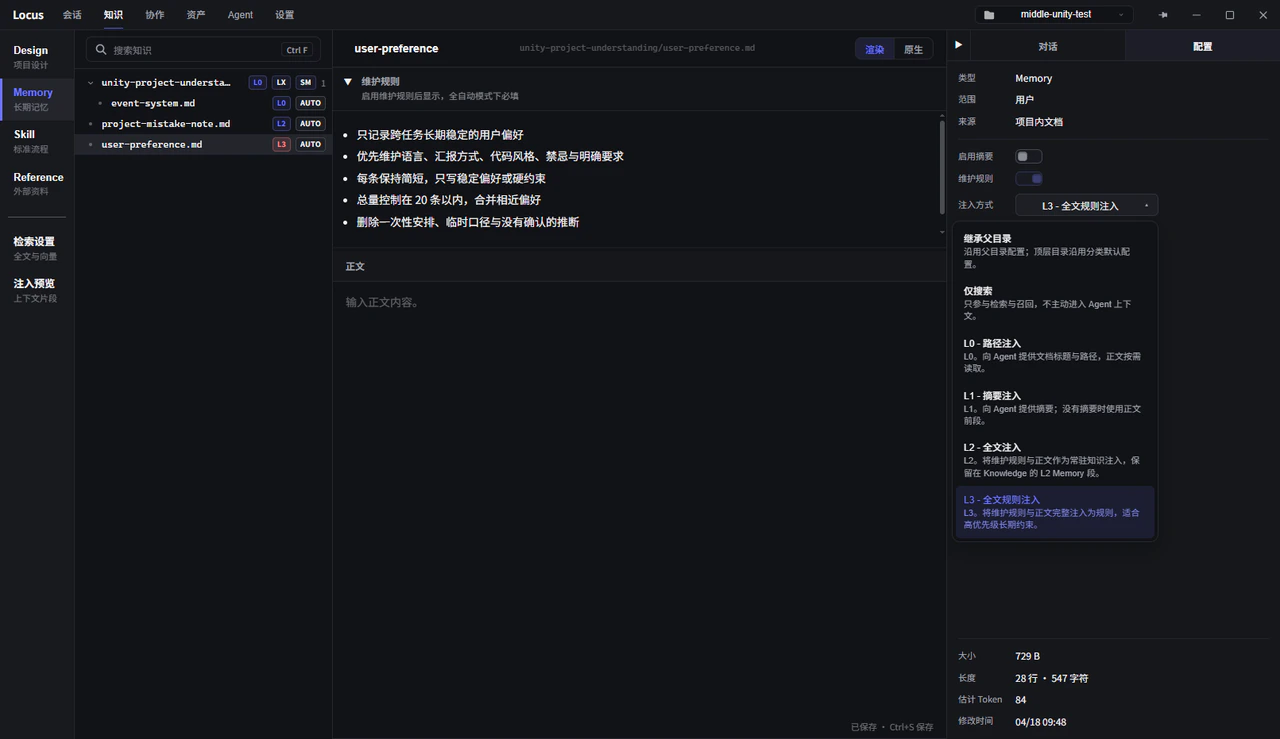
The five levels
SetInject Mode in the document’s Config sidebar:
Search Only: the document participates in retrieval and recall but never enters the Agent’s context on its own. Fits material that is large in volume and only used by specific tasks.L0 - Path Injection: gives the Agent the document title and path; the body is read on demand. Fits documents the Agent only needs to know exist, and where.L1 - Summary Injection: gives the Agent the summary, or the opening of the body when there is no summary. Fits documents whose key points the Agent should always keep in mind, with details expanded on demand.L2 - Full Injection: injects the maintenance rules and the body as always-on knowledge. Fits content of controlled length that nearly every task consults.L3 - Full Rule Injection: injects the maintenance rules and the body in full as rules. Fits high-priority long-term constraints, such as project conventions that must be followed.
No Injection on skills — it turns auto recall off entirely, leaving only the slash command.
Defaults differ by type: Design and Plan documents default to L0 - Path Injection, Skill documents to L1 - Summary Injection, and Memory and Reference documents to Search Only. Memory’s three preset modules ship pre-tuned for their roles (Mistake Notebook at L2, User Preferences at L3, Project Understanding at L0); see Design and Memory.
Summaries
WhatL1 - Summary Injection actually injects is the document’s Summary field, falling back to the opening of the body when the field is empty. Openings tend to be background rather than conclusions, so for key always-on documents, write the summary by hand: two or three sentences on what the document covers and when the full text is worth opening. The summary is also used in search result previews.
Injection targets
L2 - Full Injection and L3 - Full Rule Injection reach only the selected Agents. Choose them in the Inject into Agents panel beside the inject mode menu; the choice is stored in the injectAgents frontmatter field:
- New documents default to
All Agents, saved asinjectAgents: ["*"], which also covers Agents added later. *is a wildcard that matches any characters:"*"selects every Agent and"team-*"selects Agents whose id starts withteam-. Quote*in YAML, or write the scalar forminjectAgents: "*".- Documents without an
injectAgentsfield keep their previous behavior and inject only into the Unity Agent. Explicit lists apply as written, and[]injects into no Agent. - CSV tables have no frontmatter and always behave as documents without the field.
injectAgents.
Folder-level config and inheritance
Right-click a folder and chooseFolder Config to set an injection mode for the whole folder (Search Only / L0 / L1; L1 attaches the folder description after the folder path). Documents and subfolders default to Inherit Parent, and top-level folders follow the type default. The Effective line in the config panel states whether the active config comes from the local config, a parent folder, or the type default. When organizing documents in bulk, configure at the folder level first, then override individual documents.
Injection status
Two places show what actually gets injected:Injection statuson the folder inspect page: the count ofInjected docsand theInjected byteswithin the subtree. Always-on injection has no hard cap; growth translates directly into per-request cost, so when the volume swells noticeably, lower some documents’ levels or trim their content.Injection Previewat the top: the Knowledge content blocks the current Agent actually injects, with theEstimated token load. To confirm what the Agent really carries in a session, this is the source of truth.
Context Load card on the knowledge overview regularly; when the always-on share swells noticeably, drop low-frequency documents back to L1 or Search Only.